
Schema Guardian
Schema Guardian is Datawise's pre-merge detection layer. It analyzes GitHub pull requests, identifies schema changes that would break downstream assets, and posts a bot comment directly in the PR before anyone clicks merge.
How It Works
When a pull request is opened or updated in a connected GitHub repo, Schema Guardian:
- Fetches the PR diff from GitHub.
- Parses changed SQL and dbt model files to identify schema modifications.
- Runs the diff through AI analysis (Claude) to classify changes as breaking, potentially breaking, or safe.
- Resolves downstream impact using your connected warehouse lineage and dbt model graph.
- Posts a bot comment in the PR with the full analysis.
The bot comment updates automatically on each new commit to the PR.
What Schema Guardian Detects
Schema Guardian identifies changes in PR diffs that would affect downstream consumers:
| Change Type | Classification |
|---|---|
| Column removal | Breaking |
| Column rename | Breaking |
Data type narrowing (e.g., VARCHAR to INT) | Breaking |
| Model restructure that removes output columns | Breaking |
Data type widening (e.g., INT to BIGINT) | Potentially breaking |
| New column added | Safe |
| Index or constraint change only | Safe |
| Comment-only changes | Safe |
The Bot Comment
The bot comment appears in the GitHub PR as a comment from the Datawise bot. It contains:
Change Summary: A plain-language description of what changed and in which file. Written for reviewers who may not be deep in the dbt model being modified.
Severity: Each detected change is classified. Breaking changes are highlighted. Safe changes are listed but don't block.
Downstream Impact: The assets that depend on the changed model or table. This includes:
- dbt models downstream of the changed model
- Tableau workbooks that consume those dbt models
- Power BI reports with connections to affected tables
Only assets with a resolved lineage path to the changed asset are listed. If a downstream asset can't be traced, it is not shown.
Mitigation Recommendations: Specific steps to resolve each breaking change before merging. For example: if a column is renamed, Schema Guardian recommends updating downstream model SELECT statements and any hardcoded references in BI reports.
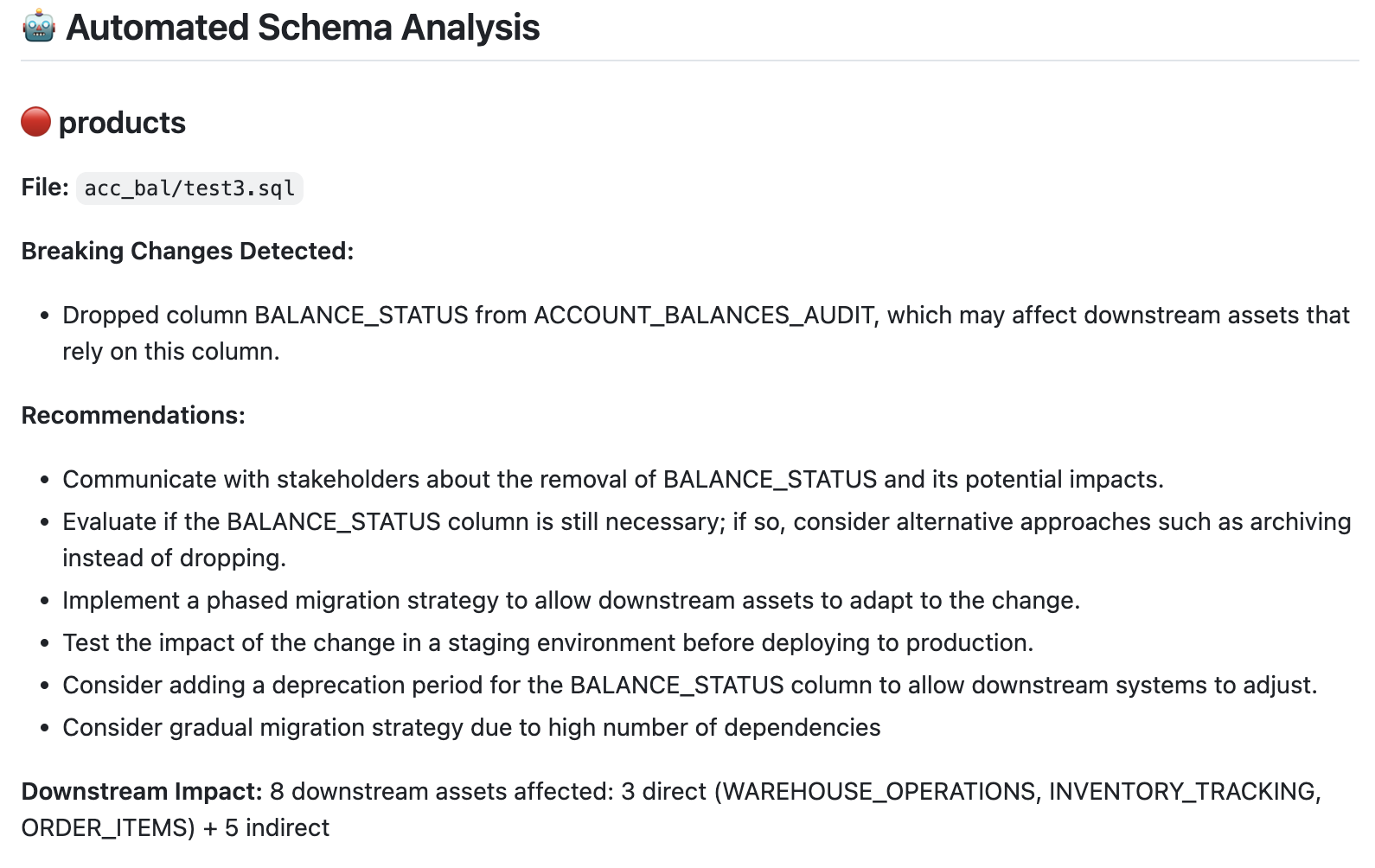
Bot comment example
Merge Protection
Merge Protection extends Schema Guardian with enforcement. When enabled, Datawise posts a GitHub status check alongside the bot comment. If a breaking change is detected, the status check returns failure and the merge button is blocked.
Available on: Pro and Enterprise.
To enable:
- Go to Settings > Merge Protection in Datawise.
- Toggle on the repos where you want enforcement.
- In GitHub, add
datawise/schema-guardianas a required status check in your branch protection rules.
Admin users can override a blocked merge from the Schema Guardian view in Datawise when a bypass is necessary.
Viewing PR Analysis
All analyzed PRs appear in the Schema Guardian section of the Datawise app. For each PR you can see:
- PR title and author
- Number of files changed
- Breaking changes detected
- Downstream assets impacted
- Bot comment status (posted, updated, or pending)
- Link to the GitHub PR
Click any PR to open the detailed analysis view, including the full lineage graph scoped to the impacted change.
Requirements
- GitHub connector must be configured and connected. See GitHub Setup.
- dbt Cloud connector is required for downstream dbt model impact resolution.
- Tableau and Power BI connectors are required for BI-layer downstream impact to appear.
- Schema Guardian only analyzes repos you explicitly selected during GitHub connector setup.
Frequently Asked Questions
Does Schema Guardian analyze historical PRs?
No. Analysis begins from the point of connection. Historical PRs are not retroactively analyzed.
What if the PR changes non-SQL files?
Schema Guardian ignores file types it doesn't recognize (Markdown, YAML configs, Python scripts). Only SQL and dbt model files are analyzed for schema changes.
Can I customize what counts as a breaking change?
Not currently. Datawise uses fixed classification rules. Configurable severity thresholds are on the roadmap.
Can I turn off the bot comment for a specific PR?
Not yet. This is a planned feature. If a PR should be excluded from analysis, contact your Datawise admin.
Updated 1 day ago